
VC-Forge
VC-Forge (VIBECODING) is a full vibecoding workspace, at /vc-forge. Describe what you want, pick a model and skills, and it writes the project into a folder you can then hand-edit, run and deploy.
What it does
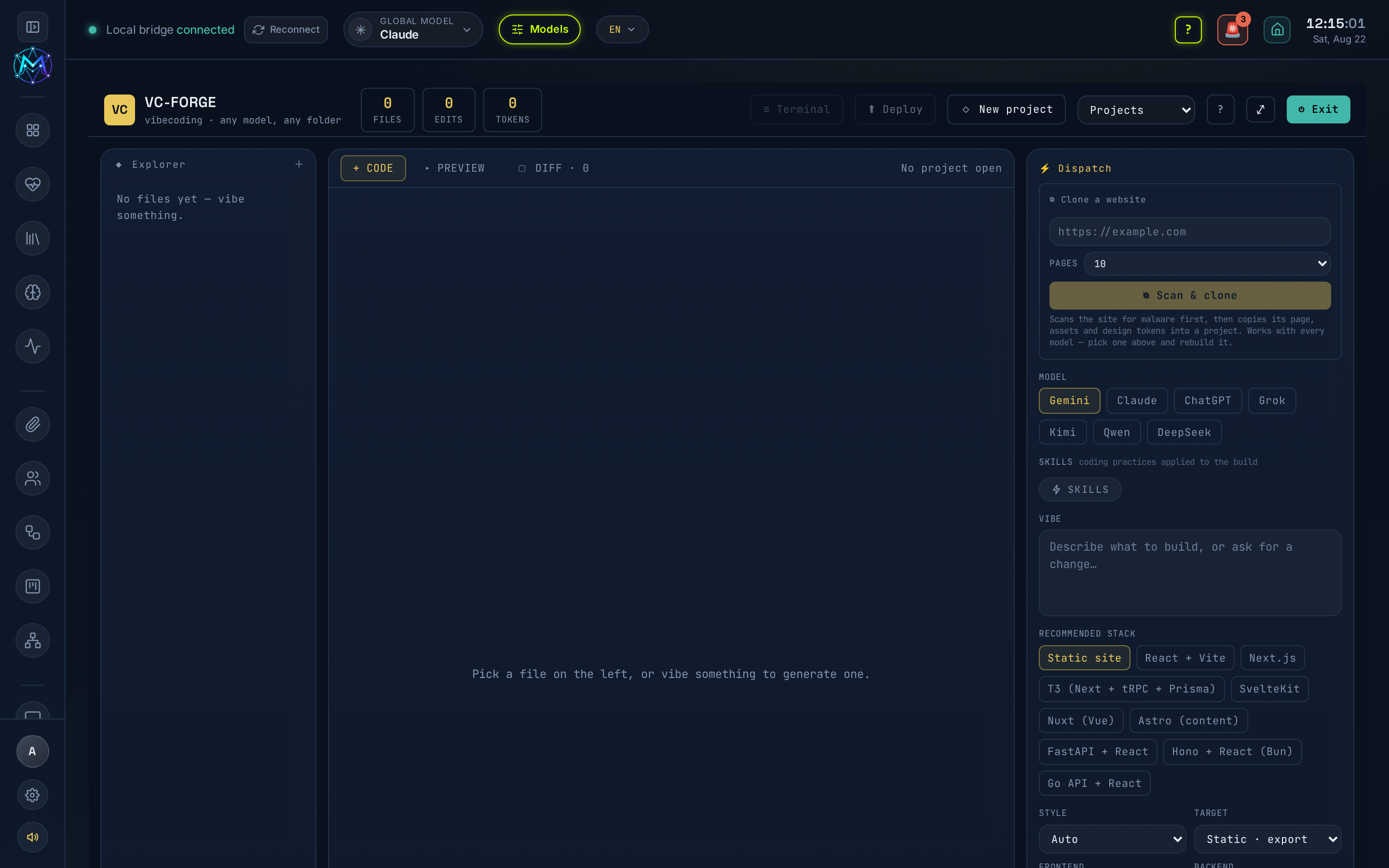
Section titled “What it does”VC-Forge is a code workspace built around three panels: a cross-platform Explorer on the left, a center editor with CODE / PREVIEW / DIFF / TERM tabs, and a right-hand DISPATCH panel where you build. You describe a “vibe”, the chosen model writes files, and you refine - by prompting again, by hand-editing in the real editor, or in the integrated terminal. Gemini via the Antigravity proxy is the tested engine.
Projects are saved to ~/Obsidian/maven-os/vibecoding/<date>-<slug>/ unless you point a project at another folder. Each project is a folder with a session.md transcript.
Explorer
Section titled “Explorer”Browses the Obsidian VIBECODING vault or any folder on disk - Linux, Windows or macOS. Files you open from disk through the Explorer are editable and savable just like the project’s own files.
Editor tabs
Section titled “Editor tabs”- CODE - a real editor. After the model finishes, hand-edit any file and save with the Save button or Ctrl/⌘-S. Works for the project’s own files and for any file opened from disk through the Explorer.
- PREVIEW - live preview of the project.
- DIFF - review changes.
- TERM - a live in-project terminal (see Terminal below).
The ⤢ button takes the whole editor fullscreen.
DISPATCH panel - building
Section titled “DISPATCH panel - building”This is where you configure and run a build:
- Model - Gemini, Claude, ChatGPT, Grok, Kimi, Qwen or DeepSeek, each routed to whatever backend it can reach in this install. Gemini (via the Antigravity proxy) is the tested engine.
- Skills - the same ⚡ Skills picker as the AI-model consoles: an Installed tab (pick from what you’ve installed) and a Find new tab (live skills.sh search with one-click install, through the security gate). There is no fixed preset list - only the skills you install or select. The chosen skills’ instructions are folded into the model’s prompt so they shape what it builds.
- Vibe - the free-text description of what to build.
- Settings - style, build target, frontend, backend, database and copy-language.
- AUTO - writes files in one pass.
- STEP - returns a plan first and applies it on your OK.
- SPEC - a spec-driven pipeline: requirements → design → tasks, each phase run through the model you picked (CLI, proxy or OAuth). A deterministic gate then checks that every requirement id (
REQ-n.m) is covered by a task and flags unresolved open questions before you implement. SPEC writesrequirements.md,design.mdandtasks.mdinto the project for review; resolve anything the gate flags, then re-run. The SPEC pipeline and gate are pure TypeScript; only the optional property-test skill needs a Python venv (see Setup).
Terminal
Section titled “Terminal”The integrated ≡ Terminal has two tabs, each its own session:
- Shell - a normal shell in the project directory.
- Herdr - an agent multiplexer.
⧉ Clone a website
Section titled “⧉ Clone a website”Paste a URL into the Clone a website box at the top of DISPATCH (or into the New project dialog) and press Scan & clone.
- Security scan first. M.A.V.E.N scans the page and its scripts for PHP webshells, self-decoding JavaScript, crypto miners, card skimmers, hidden iframes and exposed
.env/.git. A dangerous verdict stops the clone and lists what it found; you can still press Clone anyway if you know what you are doing. - Page count. Pick how many PAGES to pull - 1 (just the page you gave it), or 10 / 25 / 50 / 100. It then follows same-site links, captures each at its real path and rewrites links between them so the copy browses offline.
docs/pages.mdlists what was and wasn’t captured. - Output. The page, its assets (CSS, JS, images, fonts - including ones referenced inside stylesheets) and its extracted design tokens save to
~/Obsidian/maven-os/vibecoding/<site-name>/. The project opens withindex.html,CLONE.mdanddocs/ready to edit. The capture is plain code, so any model can then work on it.
Clone only what you have the right to copy.
Projects
Section titled “Projects”NEW PROJECT plus a project-history dropdown work like S-Forge - each project is a folder with a session.md transcript. Export any project as .zip or JSON.
Deploy
Section titled “Deploy”Serve locally, push to Vercel/Netlify (when logged in), or ship to a self-hosted Openship instance; the button shows its active context.
Deploy first runs a secrets scan over the project. If it spots committed credentials (API keys, private keys, tokens, populated env values) it holds the deploy and shows the masked hits (file:line · rule) with Cancel / Deploy anyway. It is a warning you can override - move the key to an env var, or ship regardless. The scan is local and never leaves your machine.
The integrated terminal and one-click deploy use the native @homebridge/node-pty-prebuilt-multiarch + @xterm/xterm, pulled by npm install with prebuilt binaries for Linux/macOS/Windows (no compiler needed in the normal case). SPEC mode’s optional property-test skill needs Python 3.11+ with hypothesis/pytest in a dedicated venv (.maven/vcforge/spec/.venv); the SPEC pipeline and gate themselves need none of this. Each model in the DISPATCH picker needs whatever backend it maps to (a CLI login, the Antigravity proxy, or an OAuth/API key).
- Gemini via the Antigravity proxy is the engine VC-Forge is tested against - reach for it first.
- Use SPEC when you want the requirement coverage gate to catch gaps before code is written; use AUTO for a fast single pass.
- Point a project at a folder on disk (via the Explorer or New project) to work outside the vault.
See also
Section titled “See also”- S-Forge - shares the project-folder + transcript model.
- Local-first
- Orchestration