
S-Forge
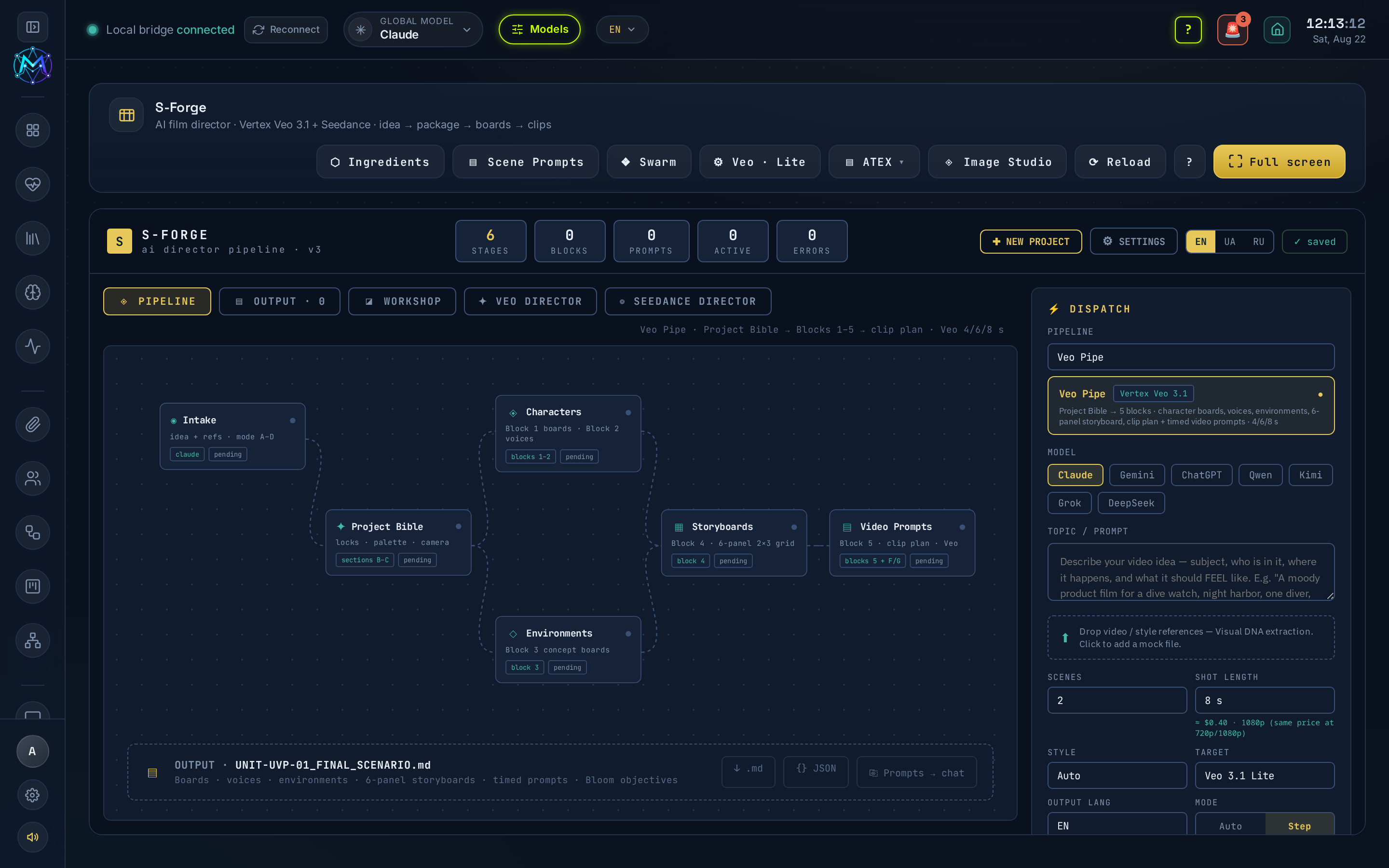
S-Forge is M.A.V.E.N’s AI film director, at /s-forge. An idea becomes a written package - scenario, character boards, voice profiles, environments, storyboard and per-clip video prompts - and then the boards and the clips are rendered for real.
What it does
Section titled “What it does”S-Forge writes the whole film package as .md, generates the stills each prompt describes, and renders video clips through your chosen engine. It began as a test polygon cloned from the older Storyboard Forge, outgrew it, and in 6.1.5 replaced it. Everything a project owns lives in one vault folder: s-forge/<seedance|flow>/<project>/ (Scroll World sites under s-forge/scroll-world/).
The manual is in the app: the ? button in the S-Forge header opens the richer S-Forge guide (source: docs/S-FORGE-GUIDE.md). It covers the pieces that are easy to get wrong - what each Veo tier does with your bound stills, why an Image Studio render is a draft until you push it, and what @Voice_Nova actually is.
Video engines
Section titled “Video engines”Pick in TARGET (DISPATCH panel):
- Seedance (fal) - 2-12 s per clip, 480p / 720p / 1080p. Billed by video tokens, so resolution changes the price: 1080p costs 2.25× a 720p clip. Renders on Seedance v1 Pro Fast.
- Veo 3.1 Lite / Fast / Standard (Google Vertex) - 4, 6 or 8 s only; 720p and 1080p cost the same, only the tier moves the price ($0.05 / $0.15 / $0.40 per second).
- Auto follows the pipeline: Flow → Veo, Seedance → fal.
The live cost of the current clip is shown under SHOT LENGTH and updates with engine, tier, resolution and duration.
Pipelines
Section titled “Pipelines”The DISPATCH pipeline picker is a dropdown: Veo Pipe / Seedance Pipe / Scroll World. The two film pipelines are different directors, each built from its own source documents, and each writes its own .md:
- Seedance Pipe (fal) →
A. Director's decision · B. Continuity lock · C. Reference map · D. Prompts (Stage 0 environments → 1 character sheets → 2 storyboard grids → 3 video → 4 voices) · E. Run order. - Veo Pipe (Vertex Veo 3.1) → the full film-director package:
A. Director's decision · B. Visual DNA · C. Project Bible (character / style / lighting / environment locks, master palette, camera philosophy) · D. Reference map · E. Production blocks 1-5 (character boards · voices · environment boards · 6-panel storyboard · clip plan + video prompts) · F. Run order · G. Preflight. It detects its input mode (idea only / video reference / style reference / existing Bible), and with a video or style reference it extracts the Visual DNA and applies its logic to your idea.
Running the pipeline
Section titled “Running the pipeline”▶ Run pipeline writes the whole package and hands you the .md.
- Mode: Step pauses after each stage for your approval - and waits for the director to actually finish writing before asking.
- Click any pipeline node to read and edit what it produced. Saved edits go into the
.md. - Prose and prompts follow OUTPUT LANG (EN/UA/RU); the structural labels (
Stage 1,@image1,CHARACTER 1,NO MUSIC) always stay English - the app routes blocks by them.
STYLE (the genre)
Section titled “STYLE (the genre)”One STYLE choice pins four things the AI-filmmaking guides treat as one decision: the route (universal, or the hyper-kinetic action bible), the STYLE LOCK copied verbatim into every prompt, the storyboard’s third annotation line (MOOD / VOICE / STYLE), and the aspect ratio. There are 15 presets, from Live-action cinematic to AAA game render (photoreal CG on the universal route) to Influencer vlog (9:16).
Scroll World - the third pipeline
Section titled “Scroll World - the third pipeline”Unlike the two film pipelines, Scroll World does not make a film - it opens its own studio and builds a scrolling website: the visitor scrolls and a pre-rendered camera dives continuously down through a sequence of scenes, with the seams between scenes frame-locked so there is no visible cut.
Describe a “dive” idea, press ✧ Draft scenes with AI to have the director design the scenes (each editable), pick your engines, then ▶ Build - it renders live and previews in the window. Finished sites save under s-forge/scroll-world/. Two engine choices:
- Image engine - scene stills, always free on Gemini.
- Video engine - Seedance (fal), Vertex Veo (Lite/Fast/Standard), or Stills only (free), a no-video parallax build that spends nothing.
The full walkthrough is in the in-app ? manual.
Workshop tabs
Section titled “Workshop tabs”- Images (including characters)
- Videos
- Characters
- Scene Prompts
- Scenes - the assembled cut. The scene builder ships in a later build.
Click any thumbnail to zoom it in place - ← / →, the mouse wheel or the ‹ › buttons page through the gallery; a click on the picture closes it again.
Scene Prompts
Section titled “Scene Prompts”Holds the whole package: the SCENARIO .MD (the pipeline writes it into the project folder - ⧉ Copy, or ✎ Open to edit it in place) plus every generation prompt as its own card - ENVIRONMENT (Stage 0), CHARACTER (Stage 1), STORYBOARD (Stage 2), VIDEO (Stage 3) and VOICE (Stage 4). Each card has ⧉ Copy, ✎ Edit and ↗ Push to chat, so you can review a prompt in the director chat before spending money.
Scene Prompts is also reachable from the header, next to Ingredients - the same cards, with ⧉ Copy and ⇩ Download, readable from anywhere (including with Image Studio open).
Reference modes (Veo)
Section titled “Reference modes (Veo)”What the app binds in ⬡ Ingredients is what the renderer gets, and each mode does something different - the director is told which ones are live before it writes a single clip:
- TEXT - no reference.
- FIRST-FRAME - one still becomes the clip’s literal opening frame. Bind a scene still, not a character model board (a board handed to this mode animates as a drifting turnaround sheet).
- INGREDIENTS - several stills condition the character’s identity without pinning frame one. Veo Standard only (Lite and Fast fall back to FIRST-FRAME).
- FIRST + LAST - mark a scene still with ⇥ and Veo generates the motion between the opening frame and that one. Works on every tier, Lite included. Use it for a match cut, or to land a clip exactly on the next one’s opening frame.
Image engines
Section titled “Image engines”The Image Studio model picker offers the fal catalog and the Codex CLI, which costs nothing per image - it runs on your ChatGPT subscription (no API key):
- Codex - OpenAI image - its built-in
image_gentool. Photoreal stills, concept art, sketches. - Codex - code-drawn board (SVG) - Codex writes the board as vector code. Use it when the picture is really an infographic: a model board or environment sheet is callout lines, swatches and a dozen labels, and diffusion models turn text into letter-shaped noise. Vector text always spells correctly.
- fal (FLUX, Seedream, Nano Banana, …) - everything else, billed per image.
Codex takes ~1-2 minutes per render (it is an agent, not an endpoint) and needs the codex CLI logged in.
Image Studio (◈), Ingredients (⬡) and Projects (▤)
Section titled “Image Studio (◈), Ingredients (⬡) and Projects (▤)”- Image Studio (◈) generates the stills the prompts describe: Character mode makes an annotated model board (with a voice from Supertonic - local, free, 31 languages - or Kokoro, or ElevenLabs); Image mode makes any other still - environments, storyboard grids, anything.
- Ingredients (⬡) binds the project’s characters / scenes / voices into the generation, so the director writes for the cast that exists instead of inventing a new one every turn. Rename an asset with ✎ (
Aria @image1) and the name rides into the director’s prompt. A bound still is also the render’s opening frame (Seedance and Veo Lite/Fast take exactly one) - bind a scene still for a shot; only Veo Standard does true multi-reference identity. - Projects (▤) - History and Archive, with ✎ rename, ⇩ archive and 🗑 delete. Every project has a PROJECT ID (
SD-0001), and that id - never the title - is the vault folder, so you can rename a project to anything, in any language, and its renders stay put. Deleting removes the dashboard entry only: the files in your vault are never touched.
Deleting bad renders
Section titled “Deleting bad renders”Use 🗑 on every gallery tile and every row of Ingredients. This matters beyond tidiness: the gallery and Ingredients list every file in the project folder, so a wrong image stays a candidate reference that could be bound and fed to the next clip. Deleted files move to the project’s .trash/ folder in the vault - nothing is destroyed.
- Vertex (Veo). Open the ⚙ panel in the header and upload your Google service-account JSON. It is stored at
secrets/vertex-sa.json(gitignored, 0600) and re-read on the next render, so you can rotate to a fresh GCP account (new $300 credit) from the browser - no env edit, no restart. Full guide with the free credits:docs/VERTEX-AI-SETUP.md. - Seedance / fal images. Set
FAL_KEY(orFAL_API_KEY) in.env.local- powers FLUX images, Seedance video and character model boards. - Codex images. Requires the
codexCLI logged in (codex login, ChatGPT subscription - no API key). - Character voices. Free local Supertonic (provisioned by
scripts/setup-free-engines.sh) or Kokoro, or ElevenLabs (ELEVENLABS_API_KEY). - Scroll World additionally uses ffmpeg for seam-frame extraction and clip encoding.
Swarm integration
Section titled “Swarm integration”Every Hermes Swarm node has an S-Forge binding - none, Director, Boards or Clips. When bound, that node’s pipeline step runs S-Forge’s own libraries instead of the Hermes CLI while staying a normal bot otherwise. The ❖ Swarm button in S-Forge seeds three such nodes for you.
- An Image Studio render is a draft until you push it into the project - see the in-app ? manual for why.
- For a shot, bind a scene still (not a character board) unless you are on Veo Standard INGREDIENTS mode.
- Rotate GCP service accounts from the ⚙ panel to keep using fresh Vertex credit without touching env files or restarting.
See also
Section titled “See also”- Hermes Swarm - bind nodes to S-Forge (Director / Boards / Clips).
- M-Forge - the video app; its Studio pipelines are also ported paid skills.
- Orchestration