
MinerU
MinerU converts PDFs, images and office docs (docx / pptx / xlsx) into Markdown, at /d-forge/mineru - a tool inside D-Forge.
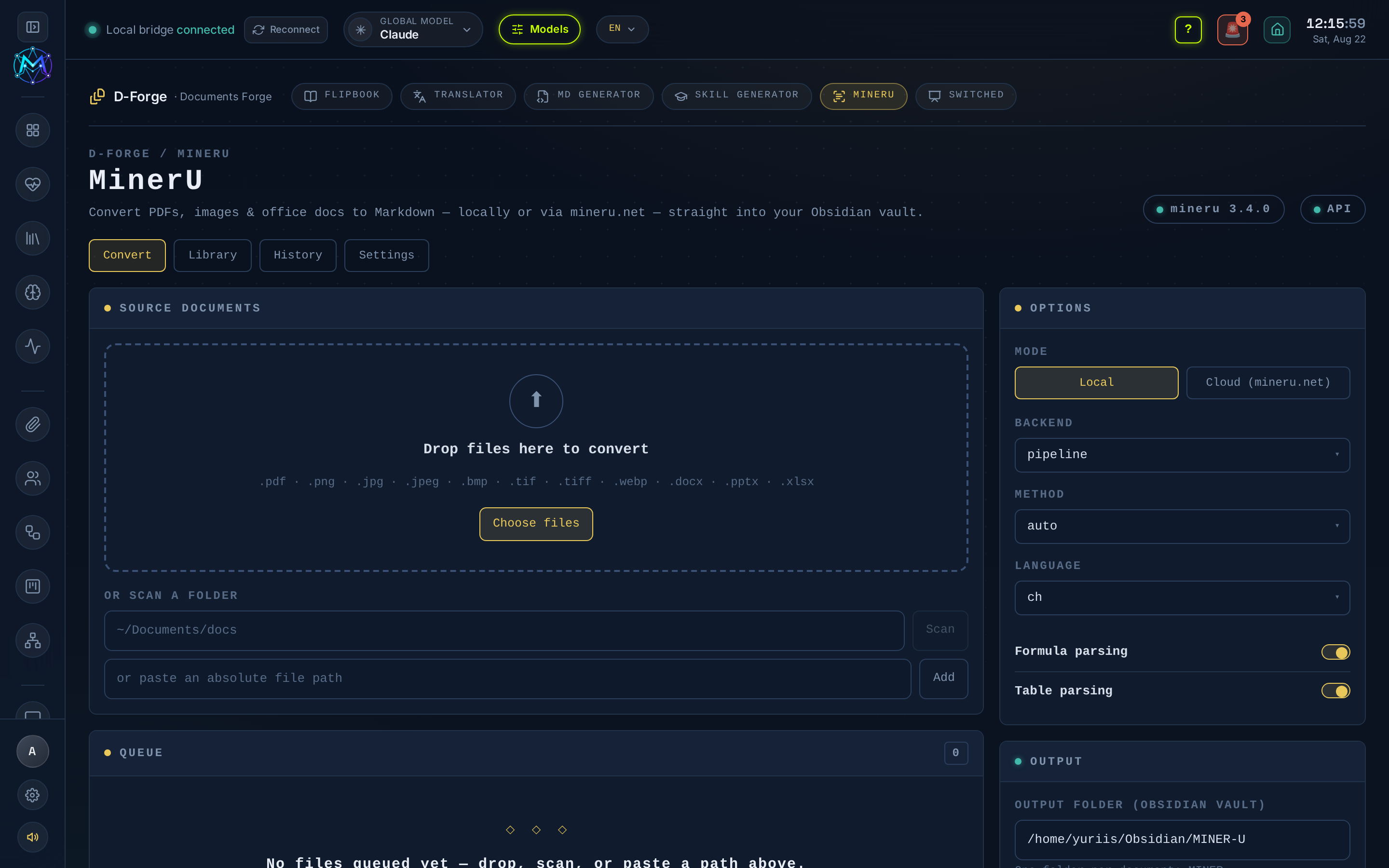
MinerU moved into D-Forge in v6.6.36; its API is unchanged and the old /mineru route redirects here.
What it does
Section titled “What it does”Turns documents into Markdown written straight into your Obsidian vault, with a source and date front-matter block and extracted images alongside the text.
Key functions
Section titled “Key functions”Four tabs:
- Convert - queue files three ways: drag-drop, Choose files (bulk), or Scan a folder (point it at any directory and it finds every convertible file). Pick a mode (see below), then hit Convert; progress streams live and each finished doc is written to the vault.
- Library - browse the converted Markdown (and images) in your vault.
- History - every past job: mode, backend, per-file success, and duration.
- Settings - defaults: output folder, a default scan folder, backend / method / language, and the local-CLI / cloud-token status.
- Local - the
mineruCLI on this machine. Choose backend (pipeline / vlm-engine / hybrid-engine), method (auto / txt / ocr), language, and formula / table parsing. Fully offline. - Cloud - mineru.net. Works with no key (token-free Agent API, ≤ 10 MB / 20 pages per file); with credentials it auto-upgrades to the Precise API (200 MB / 200 pages, batch).
Setup and dependencies
Section titled “Setup and dependencies”- Local mode needs the
mineruCLI:uv tool install "mineru[core]"orpip install mineru[core]. Thescripts/setup-mineru.shhelper provisions it hardware-aware (NVIDIA → CUDA, AMD → ROCm, else CPU) into~/.maven/mineru/venv, and is run byscripts/install-autostart.sh. - Cloud mode needs nothing. For the Precise API, put credentials in
.env.local: eitherMINERU_API_KEY(a direct Bearer token) or your OpenXLabMINERU_ACCESS_KEY+MINERU_SECRET_KEY(AK/SK, auto-exchanged for a token).
M.A.V.E.N degrades gracefully: with no CLI, Local is disabled and Cloud still works.
Where output goes
Section titled “Where output goes”Converted documents land in your vault at ~/Obsidian/maven-os/miner-u/<name>/<name>.md, with an images/ folder and source/date front-matter.
- Cloud mode is the zero-setup path - good for the occasional file within the 10 MB / 20-page free limit.
- Use Scan a folder to bulk-convert an entire directory in one job.