
Chat
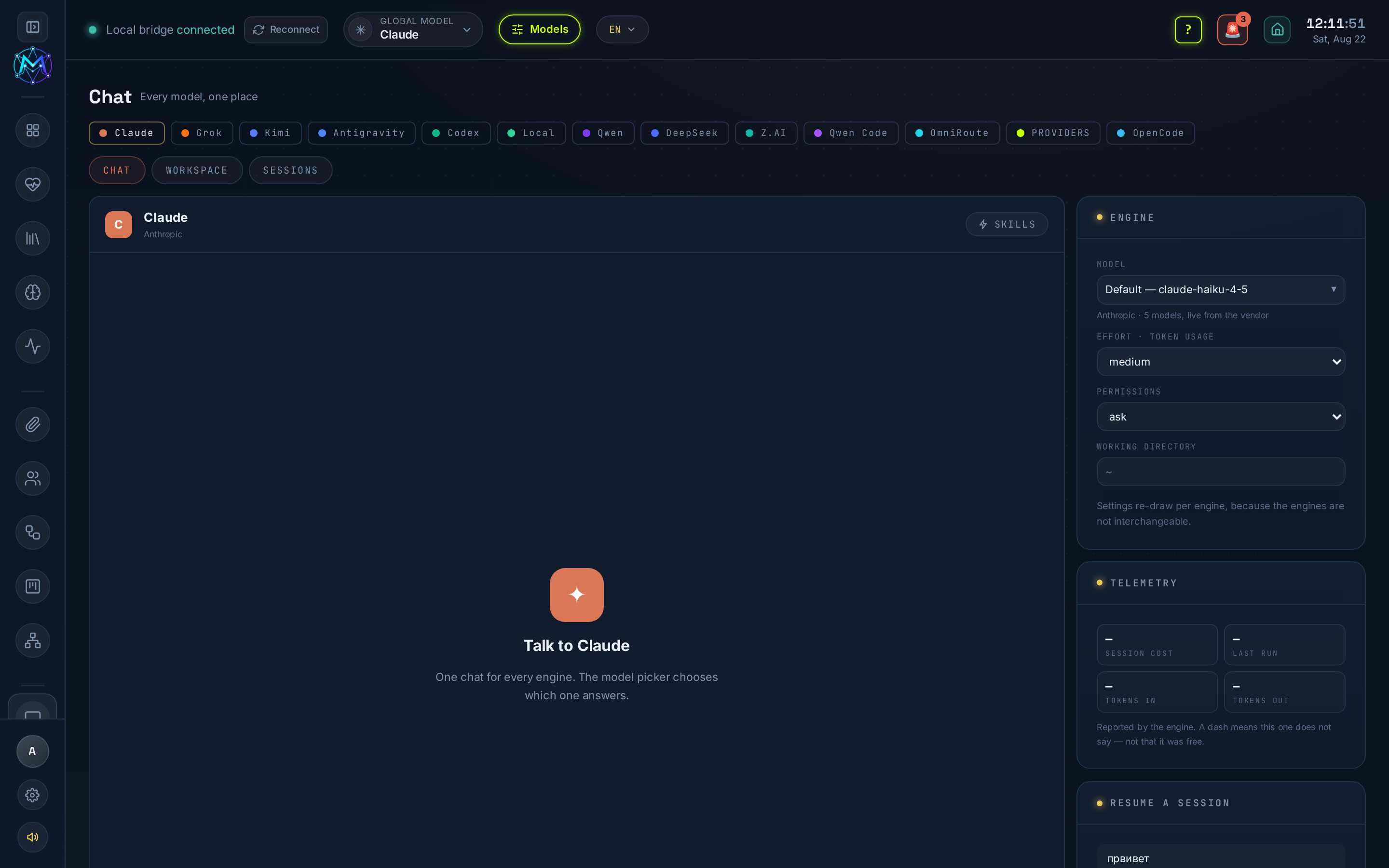
Chat is a single conversation window, at /chat, that talks to every model
engine M.A.V.E.N can reach. Since v6.14.0 there is no per-model page: you pick the engine
from the row at the top and the same window streams the reply.
What it is
Section titled “What it is”The engine row is exactly the set of models the sidebar shows, and it follows the Model Manager: switch a model off there and it is gone from here too. Thirteen engines can appear:
| Engine | Kind | ?engine= |
|---|---|---|
| Claude | Agentic CLI (Claude Code) | claude |
| Grok | Agentic CLI (Grok Build) | grok |
| Codex | Agentic CLI (OpenAI Codex) | codex |
| Antigravity | Agentic CLI or proxy | antigravity |
| Qwen Code | Agentic CLI | qwen-cli |
| Kimi | Chat API (Moonshot) | kimi |
| Z.AI | Chat API (GLM) | zai |
| Qwen | Cloud · Model Studio | qwen |
| DeepSeek | Cloud · Model Studio | deepseek |
| Local | Ollama, offline | local |
| OmniRoute | Gateway · many providers | omniroute |
| PROVIDERS | Aggregators · one key each | providers |
| OpenCode | Agent | opencode |
Each engine keeps talking to its own unchanged endpoint; the merge is in the client, one adapter per engine, so a change in one cannot break the others. The Settings column on the right redraws per engine - Claude shows model, effort, permissions and a working directory; Kimi shows model, temperature, max tokens, thinking and web search; a gateway shows only its catalogue.
Where it lives
Section titled “Where it lives”/chat, or /chat?engine=<id> to land on a specific engine. The Dashboard’s fleet
cards, the global-model box and the command palette open it the same way, carrying
your question in.
What it needs
Section titled “What it needs”Each engine needs its own setup - a CLI on PATH or a key in Settings → Secrets. An engine that is not configured is greyed out in the row with the variable or binary it wants, never hidden. See each engine’s page.
How to use it
Section titled “How to use it”- Pick an engine in the row. Switching engines starts a fresh thread and loads that engine’s history.
- Open Settings (right) and pick a model - or leave the engine’s default.
- For agentic engines, set a Working dir and a Permissions mode; attach Skills if the engine supports them.
- Type and press Enter (Shift+Enter for a newline). Attach files with the clip; dictate with the mic.
- Stop aborts a running turn. Resume reopens a past thread; CLI engines also expose their own Sessions.
- New chat files the next turns under a fresh thread.
The chat can do things, not just talk
Section titled “The chat can do things, not just talk”A chat model can call a tool to act inside MAVEN. The first is thumbnail
generation: ask for “a 16:9 cover of X” and it runs the Thumbnails tool of M-Forge
and reports the files it saved. Tools are Model-Manager-aware: before spending a
call, a tool checks whether the chosen engine is off or unconfigured and says so
plainly - disabled, not_configured, ok or error - never a story about quotas.
- History is per engine and lives under
~/.maven/chat/on this machine. - A model id belongs to one vendor, so switching engine clears the model - expected.
- Every turn auto-saves to your vault’s daily note and is metered in Telemetry.
MAVEN_CHAT_PERMISSION_MODE=bypassin.env.locallets the agentic engines run without permission prompts; autonomous apps are unaffected.
See also
Section titled “See also”- Agents - chat models vs agentic CLIs.
- Model Manager