
M-Forge
M-Forge is the unified media hub, at /m-forge - one place for every kind of media you make in MAVEN. Its top-level tabs are AI-Vision, Compose, Remove Watermark, Studio (Story / Cut / Dub), OpenMontage, Music, Thumbnails, and the in-browser Media Content Lab. OpenMontage, Music and Thumbnails were previously standalone apps and are now tabs here.
AI-Vision
Section titled “AI-Vision”Let a model watch a video. Paste a URL (YouTube/Loom/TikTok/… via yt-dlp) or a local file, pick a Task (Summarize, Transcribe, Key moments, Hook analysis, Notes, Diagnose bug, or free-form) and a Language, and the model answers grounded in the actual frames plus transcript.
- Runs as a background job - keeps going if you switch apps (a Running badge shows on return).
- Reuses the processed video for follow-up questions (no re-watch).
- Mirrors every answer to your Obsidian vault at
~/Obsidian/maven-os/vision/. - Model dropdown lists the vision models your keys enable: Claude reads frames natively; Gemini / GPT-4o / Kimi / OpenRouter get the frames as images.
- Output language is guaranteed by the model, so even English captions come back in the language you picked.
- ⤢ goes fullscreen; + New session starts a new video while keeping your history.
Works on Windows, macOS and Linux. Fetching a video from YouTube needs a JavaScript runtime, and M.A.V.E.N hands the downloader the Node it is already running on rather than asking you to install one.
Compose
Section titled “Compose”Commissions animated HTML video compositions via a Claude Code run, with preview and a Projects list (formerly the standalone Video app). Requires the claude CLI.
Remove Watermark
Section titled “Remove Watermark”Remove or add watermarks and logos on images and video. A Pipeline selector switches between:
- Local · on-device - your own
~/wm-engine(GPU). Image = LaMa inpaint of a painted mask; video crops around your box and offers Smooth · LaMa (fast, less flicker; default), ProPainter (flow-based, virtually zero flicker - best, but slow, ~30-40 s per second of video), and Sharp · LaMa (per-frame). Fully offline, no token, no limits; a status badge shows the GPU. Needs the one-time engine setup. - Cloud · HF Space - proxies to
smmisha/watermark-remover(Gemini/LaMa/OpenCV) via its REST API, keepingHF_TOKENserver-side.
Three tabs:
- Image - brush a mask, or use the box tool. Results save to
wm-removal/. - Video - drag a box; live frame counter and progress bar on long jobs. Results save to
wm-removal/. - Add logo / text - drop an image/video, draw a box you can move & resize, drop a logo PNG or text/note with colour and opacity → burned in with ffmpeg. Results save to
overlays/.
Everywhere the source frame has zoom - buttons plus mouse-wheel (up to 16×; scroll to pan) - for precise selection. (Removal outputs also land under mwm-removal/.) All results save to your Obsidian vault.
Studio
Section titled “Studio”Two - now three - production pipelines, picked with a mode card (like P-Forge’s course/presentation split). All are ports of paid Claude skills onto M.A.V.E.N’s free engines.
A written story becomes a sequence of illustrations that keep the same characters, locations and style from scene to scene. It writes a visual “bible”, draws one reference plate per character/location, then draws every scene with those plates attached so the red-haired girl stays the same girl throughout. Free on Gemini via the Antigravity proxy. Lands in ~/Obsidian/maven-os/story/<slug>/.
A raw talking-head recording becomes a clean edit. It transcribes to word-level timings (auto-selects Groq’s free Whisper tier if GROQ_API_KEY is set, else a fully local faster-whisper), the model you pick decides which spans to remove (filler words, false starts, dead air - conservative by default), long silences are trimmed deterministically, and ffmpeg renders one seamless master. The model never touches ffmpeg - it only makes the editorial call on text. Masters land in ~/Obsidian/maven-os/studio-cut/.
Voice-over into another language. Give it a local file, an upload, or a YouTube/URL (fetched with yt-dlp). It transcribes with timings, translates each line with the model you pick, speaks it, and fits every clip back onto the original timeline. Run a 10-second preview first to dial in the settings, then the full dub.
- Two TTS engines - free Supertonic (31 languages, offline, voices F1-M5) or ElevenLabs with a model picker (v3 / multilingual v2 / turbo / flash / v1) and its own voice list.
- Fine-tuning - tempo, timbre (pitch), music level, plus ElevenLabs stability / similarity / style.
- Keep original music - mixes the new voice under the source music; turns on once demucs is installed.
- Output - plays right in the tab and downloads as .m4a or .mp3; a video in gives a dubbed .mp4 out. Lands in
~/Obsidian/maven-os/studio-dub/.
DUB is a background job with a New session button - leave for another app and come back, it is still going.
All three Studio pipelines run on free engines by default; DUB’s ElevenLabs option is the only paid path and needs ELEVENLABS_API_KEY in .env.local.
OpenMontage
Section titled “OpenMontage”AI “movies” - a longer Claude Code run assembles a composition in your OpenMontage repo, tracked by pid plus output file (formerly the standalone OpenMontage app). Change folder to point at your repo if you cloned it elsewhere. During a run the agent may start a live Backlot storyboard on http://127.0.0.1:4750; Stop Backlot shuts it down (cancelling a render stops only the Claude agent, not Backlot). Needs the claude CLI (logged in) and ffmpeg on PATH; the default repo path is ~/OpenMontage (override with OPENMONTAGE_DIR). Movie mode uses fal.ai (Veo / Kling / MiniMax / Seedance) - set FAL_KEY. Renders land at ~/.maven/openmontage/<id>.mp4 and appear in Media Library.
A Suno music studio (formerly the standalone Music app). Pick a model, enter a prompt (optionally instrumental) and generate; finished tracks and covers land on disk, with your remaining Suno credits shown in the tab. Needs SUNO_API_KEY in .env.local (from sunoapi.org). Output saves to ~/.maven/music and appears in Media Library.
Thumbnails
Section titled “Thumbnails”Social Networks Posts Covers - generates social covers and posts with fal.ai image models (formerly the standalone Thumbnails app). Describe a cover (or ask for a redesign), pick a Model (FLUX.1 schnell / dev, FLUX1.1 pro / ultra, Recraft V3, Ideogram V3 - each showing its ≈ price per image), a Format / size (universal ratios plus YouTube, Instagram, TikTok, X/Twitter, Facebook, LinkedIn, Pinterest and OG presets) and a count. Needs FAL_KEY (also accepted as FAL_API_KEY); KIE_API_KEY optionally adds kie.ai as a second provider. Output saves to your vault under Thumbnails/ and appears in Media Library.
Media Content Lab
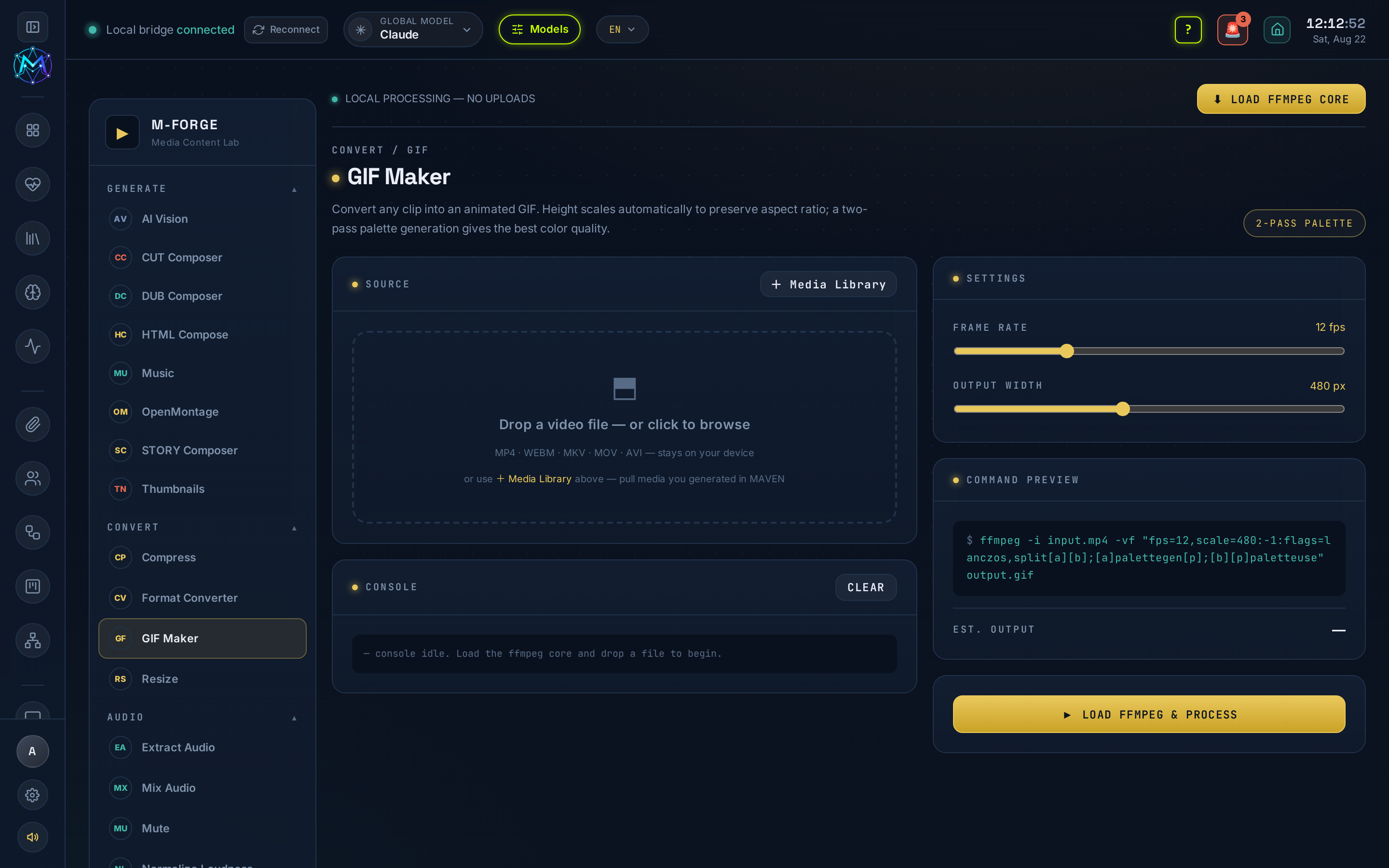
Section titled “Media Content Lab”An in-browser ffmpeg.wasm lab: ~29 quick media operations that run entirely in your browser - nothing uploads, nothing leaves your machine. The op families cover GIF maker, compress, format-convert, resize, extract / mix / mute audio, trim, speed and more. Because it is fully client-side it needs no key, no engine and no network.
- Media Library picker on every file field - instead of hunting on disk, pull in media you already generated in M.A.V.E.N (S-Forge, OpenMontage, Music, Thumbnails, Studio, …) straight from your Media Library.
- Auto-save to the vault - lab output is saved to your Obsidian vault automatically, so it shows up alongside everything else you have made.
- yt-dlp - for URL sources in AI-Vision and Studio → Cut / Dub (YouTube/Loom/TikTok/…). Local-file/upload sources need only ffmpeg. Install a standalone binary to
~/.local/bin(orbrew install yt-dlp). yt-dlp is also provisioned byscripts/setup-free-engines.sh. - ffmpeg - required across watermark burn-in, Cut and Dub.
- Compose - the
claudeCLI logged in. - Remove Watermark · Local - the one-time
~/wm-enginesetup:bash scripts/wm-engine/setup.shthenbash scripts/install-autostart.sh --now(registerswm-engine.serviceon:8189). Needs python3.11 (PyTorch has no 3.14 wheels), ffmpeg and ~6 GB disk; an NVIDIA GPU is optional but recommended (CPU fallback otherwise). Override the target withWM_ENGINE_URL, the device withWM_DEVICE=cpu|cuda. - Remove Watermark · Cloud - nothing to install; set
HF_TOKEN(kept server-side). - Studio · Cut / Dub transcription -
GROQ_API_KEYselects Groq’s free Whisper tier; without it a local faster-whisper in the Studio venv is used (~/.maven/studio/venv), no key. (Groq here serves Whisper - it is not xAI’s Grok.) - Studio · Dub - free Supertonic (
~/.maven/supertonic/venv, provisioned byscripts/setup-free-engines.sh) is the default TTS; ElevenLabs (ELEVENLABS_API_KEY) is the paid alternative. keep original music needs demucs in the Studio venv (~/.maven/studio/venv/bin/pip install demucs, pulls torch, ~2 GB). - Studio · Story - free on Gemini via the Antigravity proxy.
- AI-Vision keeps the processed video, so ask follow-up questions without paying to re-watch.
- For zero-flicker watermark removal on video use ProPainter, but expect ~30-40 s per second of footage; use Smooth · LaMa when speed matters.
- In DUB, always run the 10-second preview before the full dub to settle tempo, timbre and music level.
See also
Section titled “See also”- S-Forge - the AI film director; its Studio pipelines are also ported paid skills.
- P-Forge - shares the same free Supertonic/ElevenLabs voice stack.
- Local-first